Endpoint Installers
The Installers page centralizes every package and registration command needed to deploy Cyberhaven sensors across Windows, macOS, Linux, and supported browser extensions. Select the operating system tab that matches your target devices to reveal the relevant download links and command syntax.
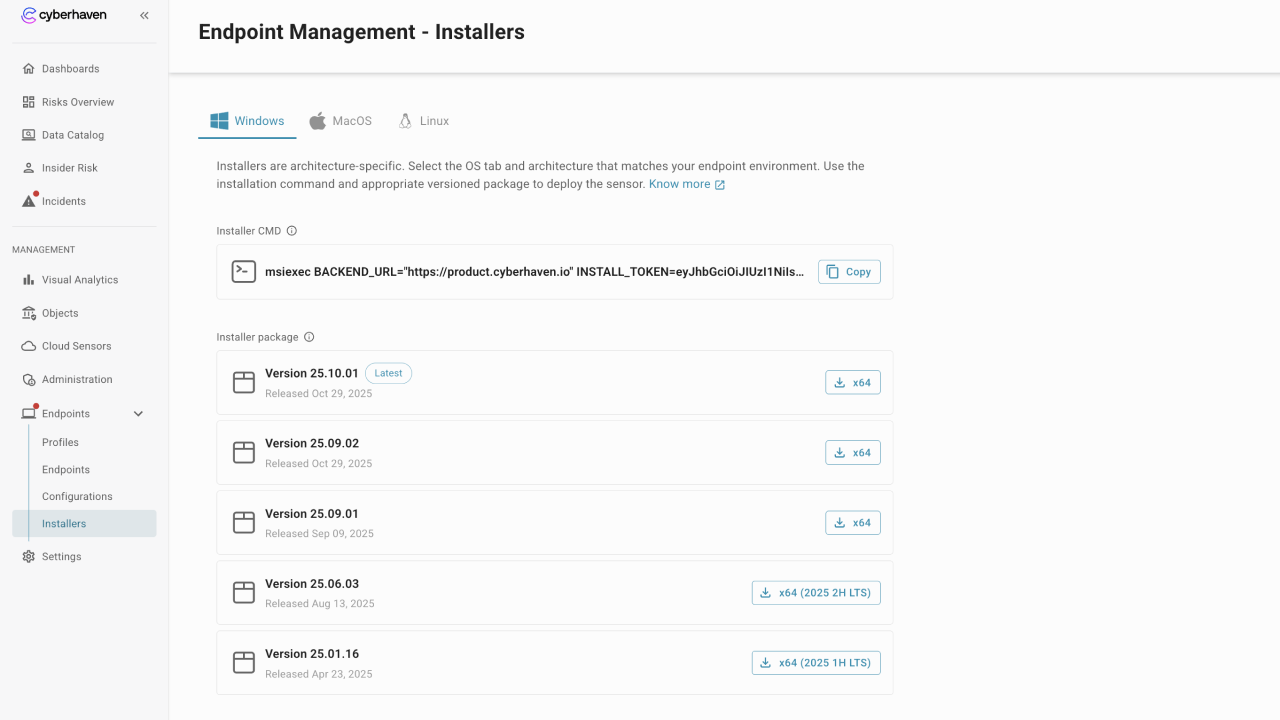
Choose an operating system
Tabs across the top of the page let you switch between Windows, macOS, and Linux. Each tab presents:
- A copy-friendly Installer CMD that includes your environment-specific backend URL and install token.
- A list of available installer packages, including the latest standard release, prior standard builds, and any Long-Term Support (LTS) versions.
- Architecture-specific download buttons (for example
x64) so you can retrieve the correct binary.
If you need guidance on which release track to deploy, review the Cyberhaven Release Cadence and End-of-Support Policy.
Copy the installer command
Use the clipboard icon next to the command to copy it for scripted deployments or command-line installs. The command is pre-filled with the correct backend URL, token, and any required flags such as silent installation options.
Download the sensor package
Each package card shows:
- Version number (for example
25.10.01) and a tag identifying the latest build or LTS release. - Release date so you can track how recent the binary is.
- A download button that delivers the installer matching your selected architecture.
For LTS releases, the download button is labeled with the relevant half-year (for example x64 (2025 2H LTS)).
Deploy the installer
After downloading the package and copying the command:
- Transfer the installer to your software distribution tool or the endpoint.
- Run the copied command, adjusting optional flags such as custom install paths or proxy settings if needed.
- Confirm that the device appears in Endpoints → Endpoints once the sensor registers.
Keep installers up to date by returning to this page whenever Cyberhaven publishes a new release.
Related deployment guides
Use the deployment documentation for step-by-step instructions tailored to each operating system: